Home Blog Page 42

The LG 49UK6200PLA 49 inch 4K Ultra HD HDR Smart TV

0

Everyone is looking for the greatest TV screen, and that’s where we think the LG 49UK6200PLA 49 inch 4K Ultra HD HDR Smart TV comes in.

It doesn’t get better for Your Fix Guide than this piece of technology, there isn’t a detail to be missed with this screen.

Every nature documentary or sci-fi movie you watch will look inexplicably more realistic than ever before.

It offers breathtaking 4K viewing and full-colour accuracy with ultra surround sound to top it off.

If the 49-inch display isn’t quite big enough then LG also offers a 55 and 60-inch version if you want to splash out.

Realism is taken to a whole new level

There are a lot of buzzwords thrown around with TV screens to the point where no one actually knows what is best anymore.

This LG screen offers the very best 4K Ultra HD viewing experience that is four times higher resolution than HD.

It’s not just documentaries and movies, think of the detail with sports and gaming and that enhanced experience in real-time.

A unique feature with this newest screen is that you can view the screen at any angle without distortion, perfect for an oddly shaped living room with multiple seats.

couple watching television

The audio enhances the visual experience

LG believes there shouldn’t be great visual effects without great audio accompanying it.

That is why this system comes with ultra surround sound to fully capture you in whatever moment you’re watching.

You could almost be fully transported to another dimension, feeling as if you’re literally in the stadium for that big football match.

All the speakers are masterfully hidden away. And this creates the effect that the sound is coming from the air around you.
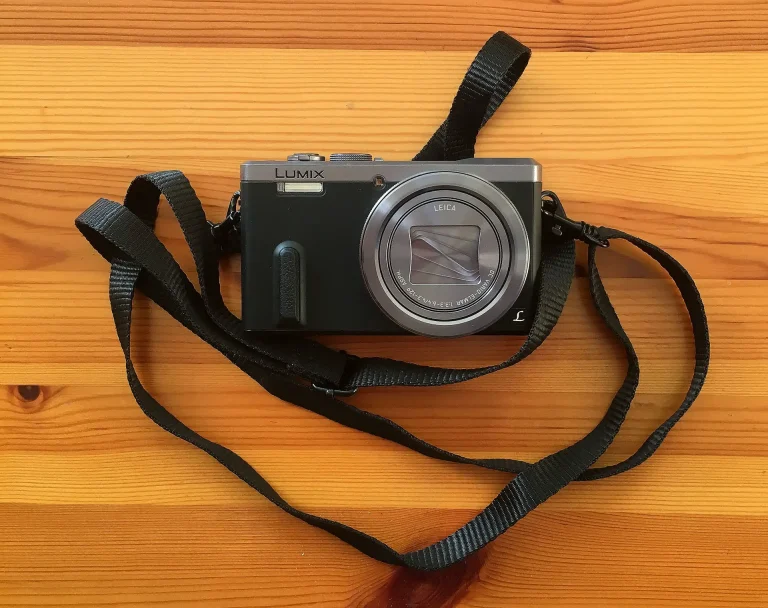
Take a look at the Panasonic TZ90: Travel camera with super zoom and 4K capability!

0

The Panasonic TZ90 is available at electrical superstore Currys and it’s a must-have camera for your travels.

When you go on holiday you don’t want to risk taking your big, expensive camera to get those magnificent shots.

But you still want those photos that you’ll cherish forever and frame to remember your amazing travels.

All of these qualities come in the Panasonic LUMIX DC-TZ90EB-S, the super compact but very advanced camera.

It has all the capabilities of a larger more expensive piece of equipment but can be slipped in your pocket.

panasonic tz90 https://picjumbo.com/download/?d=old-camera-film-photographer.jpg&n=old-camera-film-photographer&id=1
Camera Picjumbo – panasonic tz90

So many advanced features for such a small package

Resolution-wise, 4K is what everyone wants to record in these days and the Panasonic TZ90 gives you that ability with its high-quality lens.

For a smaller camera, you have the option of 30x optical zoom which is amazing for its size.

In addition to the great zooming capabilities, it offers 20.3 megapixels to snap those great landscapes.

Built-in WiFi allows you to send photographs straight to your other devices so you can share them instantly.

https://www.instagram.com/p/BpciG5uCUZy/

What puts this Panasonic camera above the rest?

This advanced camera weighs just 300g and can slip into your pocket, yet can do everything a larger piece of equipment can do.

It shoots 4K looking forward but also has a 4K selfie mode so you can look even better on Instagram.

With the megapixels providing the detail, the wide-angle lens allows you to capture more of the landscape than ever before.

The electronic viewfinder allows you to make sure you’re getting the best photo even when you’re being blinded by that holiday sun.

https://www.pexels.com/photo/person-holding-black-dslr-camera-2923672/
Pexels camera

Deals on the Panasonic TZ90 and other travel cameras at Currys

Currys are offering the Panasonic TZ90 online for the low price of £299.99 which is a steal for a camera of this quality.

For £310.99 they offer a bundle of the TZ90 and a 32 GB memory card to make sure you have enough memory when capturing those high definition videos.

The Canon Powershot SX720 comes with a travel kit but doesn’t quite give you the same recording capabilities of the Panasonic TZ90 and is almost double the weight.

ARE YOU HAVING ISSUES WITH YOUR DIGITAL DEVICE? CALL DIGI HELPDESK TODAY ON 0800 433 7963

https://digihelpdesk.co.uk/alexa-group-device-unreachable-a-common-amazon-echo-issue-solved/

Samsung Smart TV 55 F8000 explored: review, specs, and more!

0

Samsung is a world-renowned company famed for its cutting edge technology and aesthetically pleasing designs.

Everything from mobile phones to TVs and home appliances is produced by Samsung which started as a company in 1938.

Running for over eighty years has got put any company in good stead to be one of the leaders in tech and Samsung aren’t showing any signs of slowing down in 2019, either.

This year sees the launch of Samsung’s first foldable device, the Galaxy Fold as well as the Galaxy Note 10+.

The Samsung Smart TV 55 F8000 may have been released in 2013, but its specs certainly stand the test of time.

Seeing a ‘Sky error code 50-9-503’ pop up? Here’s what to do…

Samsung Smart TV 55 f8000

Samsung F8000: Review

It almost goes without saying that Samsung is a leader in the TV market.

And with this 55-inch LCD screen, Smart TV online features, multimedia playback and a curved version of the TV, you can’t really go wrong.

Design-wise – slimline, delicately framed and perfectly finished -the F8000 is impressive before you’ve even switched it on.

Smart features such as having access to the BBC iPlayer just make modern-day life that little bit easier. Within a few clicks, you can be catching up on your favourite series or watching the latest blockbuster movie. There’s even a games panel so unlimited fun can be had with this television.

A Quad-Core Processor, Voice Interaction, Clear Motion Rate and 3D technology makes this TV a cut above the rest. These factors ensure you’ll get a fast, responsive, clear and impressive TV viewing experience.

We reviewed the Philips portable speaker sba3010! Here are the pros and cons…

Samsung F8000 specs

Buying the right TV for you can be hard. Depending on how many people you have to take into consideration, such as children, sports fans or elderly family members, the process can be made more difficult.

But, with all factors considered, can you ever really have too many good points to a TV? The F8000 looks to deliver in all areas and puts itself out there as a great all-rounder.

Whether you need high-definition for football games, easy-to-access gaming for the kids, or a simple USB port for the movie buffs, this Samsung model has it all.

Let’s take a look at the specifics…

  • Resolution – 1920 x 1080
  • HDMI ports
  • USB ports
  • Tuner type: Analog & Digital
  • 3D compatible
  • HD ready

Fix Sky error code dsu 502 – how to stop getting error codes and more

0

Watching TV couldn’t be easier in 2019. Wherever you are, it seems that with the new and improved Sky Q package you can watch your favourite shows without a hitch.

As well as Sky Go, Sky Q has its very own app which can be used on tablet and mobile.

But, whether you’re watching Sky channels on your TV, via the Sky Q app or through Sky Go, the last thing you need is an error message.

So, here’s what to do if you’re experiencing the Sky error code – dsu 502.

https://pixabay.com/photos/antenna-television-tv-aerial-70410/
Pixabay

Why does the Sky error code ‘dsu 502’ happen?

There are a tonne of reasons why you might encounter a Sky error code. But here are some suggestions as to what could be causing the ‘dsu 502′ error code…

It’s important to check your internet connection as many issues can arise out of network connectivity problems. Sky are yet to say what it is that causes the Sky error code. In their troubleshooting process, they simply ask whether the error code relates to a connection problem, an unknown error, or your subscription’. If you’d suspect that it’s something to do with your network connection then turn your wifi hub and wait a few minutes then reconnect everything and try again.

Your satellite signal connection could also be to blame for a Sky TV error code. Have you had bad weather recently? Do you live in an area with lots of trees? These are things to consider if you’re having problems watching Sky TV.

If you need immediate assistance then Digi Helpdesk is always here to help on 0800 433 7963.

https://elements.envato.com/girl-works-on-the-tablet-PZCZ4ZB
Credit: KonstantinKolosov

How to fix Sky error code dsu 502

The following four steps should get your Sky error code rectified…

  1. First, uninstall the Sky Q app from your device.
  2. Next, you’ll need to ‘forget’ your home wifi network.
  3. Now, shut down and unplug the Sky Q box. Wait a few minutes, then power up the Sky Q box.
  4. Re-connect to the wifi. Now re-install the Sky Q app and everything should be working perfectly.

If you’re still experiencing issues with your digital device then don’t hesitate to contact Digi Helpdesk today.

https://www.instagram.com/p/Buo-VftlEjR/

How can I stop getting Sky error codes?

Sky error codes are often preceded or accompanied by buffering on your chosen TV programme. Even if you’ve downloaded the show it can still buffer.

It’s important to check your wifi speed and ensure you’re receiving a good signal. You can try disconnecting other devices from the wifi to see if that makes a difference to your Sky TV viewing.

There is no one cure to stop Sky error codes however there are some basic checks you can carry out to establish why the error code has occurred.

Check all the wiring, satellite dish, wifi signal strength, location of home wifi hub and your device settings to begin with. Then try turning things off and on again, logging out and in again and uninstalling and reinstalling apps.

Seeing a ‘Sky error code 50-9-503’ pop up? Here’s what to do…

0

Sky TV users can experience errors for lots of different reasons.

Your settings, the weather and your network connection can all affect your Sky TV viewing.

It’s essential to go through all the basic checks when something goes wrong with your TV, box or Sky TV app.

It goes without saying that you are receiving a satellite signal, all the cables (HDMI, Scart and more) are fixed correctly, the satellite signal isn’t being blocked by anything and that your settings haven’t set any of your devices to ‘sleep’ mode.

With all this being said, here’s how to combat the ever-irritating Sky error code 50-9-503…

Sky Go Chromecast workaround: Get the app working on any device!

man watching tv smiling

Why am I experiencing error codes on Sky TV?

If you’re reading ‘error code 50-9-503’ on your Sky TV screen then it could be due to a few reasons.

Firstly it could be to do with your satellite signal. If no satellite signal is being received due to bad weather then that’s something to consider or there could also be something blocking your dish on the roof – are you in an area with lots of trees?

Another thing to look at is whether your devices are set to ‘sleep mode’ from a certain time. This can interfere with your Sky TV viewing and can easily be changed. This is important to consider if you’re usually having issues watching Sky TV during the evenings.

Lastly, it could be a network issue. This is the most likely cause as Sky are yet to establish exactly what it is that causes the error code 50-9-503. For this, we’d advise resetting your hub as well as the device you’re watching TV on.

Business man holding tablet

How to fix Sky error code 50-9-503

Follow the steps below to fix the Sky error code 50-9-503:

  1. Firstly, uninstall the Sky Q app from your device, whether that’s a phone or tablet.
  2. Next, you’ll need to ‘forget’ your home wifi network.
  3. Now, shut down and unplug the Sky Q box.
  4. Then power up the Sky Q box.
  5. Re-connect to the wifi – you may have to re-enter your details and relevant passwords.
  6. Lastly, re-install the app and everything should be working as normal!

Music device greyed out on the Alexa multi room app? Here’s what to do…

0

Amazon’s range of smart speakers is certainly one of those little things helping make modern life easier. And now with the addition of the multi-room function, you can have music all over the house -all without the click of a button! You have music at your service via Amazon’s virtual assistant, Alexa.

However, when these devices start to go wrong, there’s nothing more irritating and Alexa can quite quickly go from your loyal assistant to someone you simply don’t want to speak to anymore.

So, to avoid any more aggro at the hand of Alexa here’s how to sort out your multi-room music issue if the device is showing as ‘greyed out’…

Sky Go Chromecast workaround: Get the app working on any device!

https://elements.envato.com/stylish-modern-businessman-workplace-concept-on-36XN9AM
Credit: Vladdeep

Alexa multi-room music device ‘greyed out’

If you’ve got more than one Echo then you’re on the right track to setting up Amazon’s multi-room.

The smart speakers can be controlled via Amazon’s Alexa app so you’ll also need to have this downloaded. You can download the app from the Amazon Appstore, Google Play, or the Apple App Store.

To set up multi-room head to ‘settings’, then under ‘audio groups’ you should see ‘multiroom music’. Now, create a group and then select all of the devices you want included in the multiroom group.

Alexa will then check your devices, which can take a few minutes, and then you should have your multi-room group ready to go.

If the device you want to connect to is ‘greyed out’ then try re-registering your Echo and confirm that both devices are on the same wireless network.

https://elements.envato.com/man-holding-phone-young-businessman-in-business-M4FZQHV
Credit: rawf8

Is Alexa multi-room not working?

If the Amazon Echo multiroom function isn’t working, here are a few solutions you can try.

The first thing to try is to turn all your devices off, wait a few minutes and then turn them on again. This sounds simple but people often forget to do a system reset on their devices.

Uninstalling and reinstalling the Amazon Alexa app can also work wonders and should get multiroom up and running.

Also, ensure that the software on all the devices you’re using is up-to-date.

https://www.flickr.com/photos/stockcatalog/42820690351
Amazon Alexa Echo Dot Flickr user: Stock Catalog

How much does an Amazon Echo device cost?

In 2019 Amazon offers a wide range of different smart speakers and they even have a variety of smart speaker accessories, too.

A great all-rounder is the Amazon Echo 2nd generation which you can pick up online from Amazon for £90.

However, if you’re after something a bit more pocket-friendly then we would suggest buying the Echo Dot which costs £50.

If you’re looking for a seriously cool alarm clock then we’d say to opt for the Amazon Echo Spot. That comes in at around £120.

Finally, for those looking for second-to-none audio quality then go for the £140 Amazon Echo Plus.

https://www.instagram.com/p/Bat_Apcj_d_/


Get Technical Support From a Digi Advisor..

How to reformat your Sky+ boxes’ hard drive and reboot the whole system

0

After years of enjoying Sky TV, it’s quite common to find that your Sky Box storage is completely full—it’s almost expected with the abundance of content readily available.

Thankfully, you can easily reformat or reset your Sky+ box using Sky Planner Rebuild and/or Factory Reset.

Whether you need to complete a reboot of the whole system or you simply want a blank slate. It’s effortless to reformat your Sky+ Box’s hard drive and start afresh. 

Sky Go Chromecast workaround: Get the app working on any device!

woman hand holding a tv remote watching tv

What will a planner rebuild do to my Sky+ box?

If you’re wanting to re-boot your Sky box but need to keep your stored settings and recordings then we’d advise completing a Planner Rebuild.

  1. Press the Services button.
  2. Choose option 4 – System Setup.
  3. Press the 0, 1 and Select buttons on your Sky remote control.
  4. This should take you to the Installer Setup menu.
  5. Choose option 7 – Sky Planner Rebuild.
  6. Select Sky Planner Rebuild and wait until the system message ‘Housekeeping please wait’ has gone and the system has restarted.
father and son watching the tv and celebrating

How to reformat your Sky+ box

Reformatting your Sky+ box should only be used as a last resort, as all your storage including your recording will be destroyed. If you would like to factory reset your Sky+ box then:

  1. Click the Services button on your remote.
  2. Press 001 on your remote then the select button.
  3. This will take you to the Setup window.
  4. Click across to System Reset and select.
  5. A ‘For your information’ box will appear and display ‘Housekeeping please wait’. 
  6. Your box will now reset and reboot by completing a planner rebuild and factory reset on your box.
  7. The box will be wiped like new.

Can’t pause or rewind Sky Q? Here’s how to fix this common Sky TV problem

Hand holding tv remote

Can you format a Sky+ hard drive?

Yes. A Sky box hard drive can be completely wiped by carrying out a system or factory reset. However, if you still wish to keep your chosen settings, series links and recorded programmes then we’d advise always completing a Planner Rebuild first.

Reformatting your Sky+ box should be a last resort, if you’re experiencing issues with playback on your Sky box, you should always complete some basic checks first:

  • Check all your wiring is correctly linked up
  • Ensure that your box and TV are powered on 
  • Check if your Broadband is working

Has the Sony Crime channel disappeared? Freeview issue explained!

0

37% of UK households use Freeview TV. It’s easy-to-use, and a cheaper alternative to watching your favourite channels.

Now and again it’s completely normal for TV channels to change number, name or viewing hours. However, many Freeview users have been left wondering where the Sony Crime channel has gone.

Without warning, it seems that the channel that provides us with 48 Hours, True Crime and Fatal Attraction is gone for good.

So, has the Sony crime channel disappeared on Freeview? And will it ever come back? Here’s everything you need to know about the Freeview issue and how to fix it…

Everything you need to know about Toshiba’s ultra-HD TV: Best prices and more!

bored man sitting and watching tv

Why has the Sony Crime channel on Freeview disappeared?

The Sony Crime Channel was sadly terminated in June 2020. The good news is you can still watch your favourite crime shows on channel 67, which is now True Crime.

In June 2019, Sony made the decision to move the Sony Crime Channel from channel 40 to channel 60 due to low ratings. They also renamed the sister channel, Sony Crime +1, to Movies4Men and moved that channel from 60 to 48.

Fast forward to 2023, Movies4Men Is now called Great! Movies Action and solely airs films on channel 42. Even though the Sony Crime channel was terminated in 2020, Freeview has over 100 channels for you to enjoy.

I have lost BBC1 and BBC2 2020: How to get your Freeview channels back

man holding tv remote

Freeview: Who can get the Sony Crime Channel?

Unfortunately, the Sony Crime channel was closed in June 2020. Before its demise, the crime channel was only available in a few locations within the UK like Manchester. 

If you are familiar with Freeview, then you will know that some channels are not available everywhere in the UK. If you’re unsure whether a channel should be showing in your tv guide then you can check here on the Freeview address checker.

A retune may be required for Freeview users throughout the year but you should receive notification from Freeview when this is required.

tv remote on newspaper

What channels should I get on Freeview?

The fact that the TV service provides free-to-air channels is great but dependent on where you live and what TV you have, the channel availability can vary.

Everyone on Freeview should at least be able to get BBC One, Two and Three. ITV, ITV2, 3 and 4, Channel 4 and 5. E4, More4 and Film4 should also be readily available. However, if you’re ever missing channels be sure to carry out a retune. Some TV’s carry out automatic retunes themselves but if not you’ll have to complete one.

Freeview won’t pick up ITV: Why this happens and what to do now

Everything you need to know about Toshiba’s ultra-HD TV: Best prices and more!

0

There are so many TVs to choose from we really are spoilt for choice these days.

LEDs, plasmas and Smart TVs are just a few of the options with new releases hitting the shelves every day.

TVs no longer just provide you with a simple screen to watch, options ranging from sound cloud, Freeview and blue tooth capabilities, are all key features to consider when it comes to making your decision on what TV to buy.

Toshiba brings an extensive range of televisions to the table, today we take a look at one of them.

Here’s everything you need to know about the Toshiba 43u6863db.

Everything you need to know about the Virgin Media Superhub 3.0
man hand holding tv remote

Five key features of the Toshiba 43u6863db

Toshiba is well known for …

  1. With a 43 inch screen, mounting this TV on the wall gives you a great cinema experience.
  2. You can enjoy your favorite shows and movies in crystal clear 4K Ultra HD.
  3. Expect less blur with a high-quality picture running at 50 Hz.
  4. XSound Pro gives you clear sound for full immersion audio, ensuring excellent sound quality.
  5. The TV comes with a built-in speaker system along with a subwoofer so you really feel the bass.

3 ways to get your box out of dreaded Sky diskless mode

Where to buy Toshiba’s 4K Ultra HD TV

Released in 2018 the television is available to view on Amazon.

Remember the u6863db comes with built-in Freeview for all your favorite channels.

The TV also works with Amazon Alexa for voice control and has Bluetooth audio support.

Want your Sky remote to work with a Techwood TV? Here’s the remote code you need!

0

Sky has over 23.12 million subscribers in 2022 according to Statista.

And for all TV viewers, there’s always the issue of getting up to find the remote control.

It’s more than likely that you want to use just one remote for your TV rather than rooting around to find another one for the volume controls.

So, here’s the Techwood Sky remote code you need.

Review of the Techwood 55AO8UHD TV: Amazing value for money

person watching football match on tv

Techwood Sky remote code

Working out how to configure your Sky remote with a TV can be confusing.

But by following these simple steps you can use your Sky remote control for everything very easily.

According to online forums, the Techwood Sky remote code is 065. However, Sky suggests 0584, 0065 and 0772. You can search for your specific code using Sky’s online tool.

So here’s what to do…

  1. First things first grab your Sky remote control
  2. Click ‘TV’ on your Sky remote.
  3. Next, press down the ‘select’ button and the red button at the same time.
  4. The red light at the top of your Sky remote should now flash two times.
  5. Now enter your code.
  6. Finally, press ‘select’ and your Sky remote should be working with your TV.
    Happy friends watching tv together

My Sky remote still isn’t working with my TV

Many people prefer to have their Sky remote control paired with the TV, this makes things easier as you’ll be able to turn the TV on and off, select input sources and alter the volume.

If your Sky remote control still isn’t working then we’d suggest visiting Sky’s website for more information.

Where can I buy a new Sky remote control?

There are a few different options when purchasing a new Sky TV remote.

You can buy one directly from Sky here.

However, it may be more cost effective to look around online.

There are remotes available through Amazon.
woman with feet on table watching tv at home

3 ways to get your box out of dreaded Sky diskless mode